Create an A record with CLI
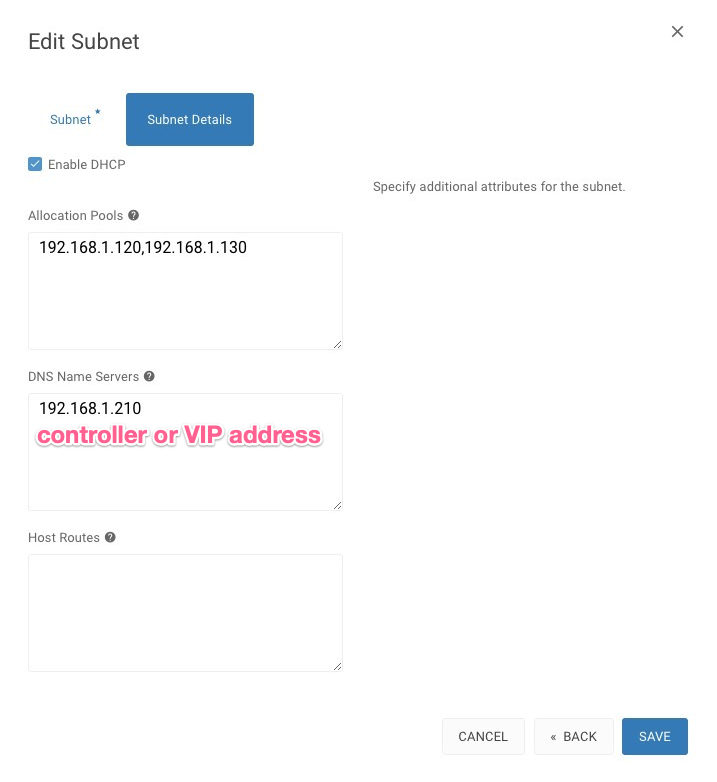
Setting the DNS of Network
Goto Admin > Network > Networks, click on the Network Name from the list of your Networks then hit the action button EDIT SUBNET, go to Subnet Details and type in your DNS Name Servers, it should be your controller IP address or VIP and SAVE
Connect to console
Warning: Permanently added '192.168.1.210' (ECDSA) to the list of known hosts.
Password:
Welcome to the Cube Appliance
Last login: Wed Feb 4 05:26:05 2020 from 192.168.1.22
#
Load server Credentials
# . /etc/admin-openrc.sh
[zone_id] Create a Zone
+----------------+--------------------------------------+
| Field | Value |
+----------------+--------------------------------------+
| action | CREATE |
| attributes | |
| created_at | 2020-02-05T08:43:12.000000 |
| description | None |
| id | a475d193-7873-4f2a-9d90-c7792fae6734 |
| masters | |
| name | bigstack.co |
| pool_id | 794ccc2c-d751-44fe-b57f-8894c9f5c842 |
| project_id | 03525522f7c547cd88627c626896d04a |
| serial | 1580898425 |
| status | ACTIVE |
| transferred_at | None |
| ttl | 3600 |
| type | PRIMARY |
| updated_at | 2020-02-05T10:27:10.000000 |
| version | 4 |
+----------------+--------------------------------------+
[network_id] Show network list
    # openstack network list
    +--------------------------------------+-------------+--------------------------------------+
    | ID                                   | Name        | Subnets                              |
    +--------------------------------------+-------------+--------------------------------------+
    | 62420cb0-67c3-476a-ae7b-09d64698b303 | lb-mgmt-net | fcce41dd-b99a-482c-8117-b6791f6ae743 |
    | bdf01063-4500-4266-9363-36414ba6d252 | internet    | 3caa9b99-e3a9-453c-9b91-13dd67fa78dd |
    | f5050464-a1e4-4e19-8c04-3949a5cf0340 | private     | 24d713e8-5db4-4fc5-bac0-747547737bb0 |
    +--------------------------------------+-------------+--------------------------------------+
Create a Floating IP on internet [network_id] and set the A record
    # neutron floatingip-create bdf01063-4500-4266-9363-36414ba6d252 --dns_domain bigstack.co. --dns_name cubeos
    Created a new floatingip:
    +---------------------+--------------------------------------+
    | Field               | Value                                |
    +---------------------+--------------------------------------+
    | created_at          | 2020-02-05T07:53:52Z                 |
    | description         |                                      |
    | dns_domain          | bigstack.co.                         |
    | dns_name            | cubeos                               |
    | fixed_ip_address    |                                      |
    | floating_ip_address | 192.168.1.138                        |
    | floating_network_id | bdf01063-4500-4266-9363-36414ba6d252 |
    | id                  | 1877cad5-017d-4780-91c2-7bd5caf005d9 |
    | port_id             |                                      |
    | project_id          | 03525522f7c547cd88627c626896d04a     |
    | revision_number     | 1                                    |
    | router_id           |                                      |
    | status              | DOWN                                 |
    | tags                |                                      |
    | tenant_id           | 03525522f7c547cd88627c626896d04a     |
    | updated_at          | 2020-02-05T07:53:52Z                 |
    +---------------------+--------------------------------------+
[zone_id] Look for zone ID of domain
# openstack zone show bigstack.co.
+----------------+--------------------------------------+
| Field | Value |
+----------------+--------------------------------------+
| action | NONE |
| attributes | |
| created_at | 2020-02-05T08:43:12.000000 |
| description | None |
| id | a475d193-7873-4f2a-9d90-c7792fae6734 |
| masters | |
| name | bigstack.co |
| pool_id | 794ccc2c-d751-44fe-b57f-8894c9f5c842 |
| project_id | 03525522f7c547cd88627c626896d04a |
| serial | 1580898425 |
| status | ACTIVE |
| transferred_at | None |
| ttl | 3600 |
| type | PRIMARY |
| updated_at | 2020-02-05T10:27:10.000000 |
| version | 4 |
+----------------+--------------------------------------+
Check out the record list by [zone_id]
    # openstack recordset list a475d193-7873-4f2a-9d90-c7792fae6734
    +--------------------------------------+-------------------+------+--------------------------------------------------------+--------+--------+
    | id                                   | name              | type | records                                                | status | action |
    +--------------------------------------+-------------------+------+--------------------------------------------------------+--------+--------+
    | 0f161f6e-6a8f-4d60-aeb4-56769bcba66c | bistack.co.       | NS   | sky8.cube.org.                                         | ACTIVE | NONE   |
    | 33d38c32-eac9-4fb4-a665-fcc0f3c57ac8 | bistack.co.       | SOA  | sky8.cube.org. c.l.com. 1580898425 3538 600 86400 3600 | ACTIVE | NONE   |
    | 1c2aa656-f99b-4e8a-b35b-89943ecce255 | cubeos.bistack.co.| A    | 192.168.1.151                                          | ACTIVE | NONE   |
    +--------------------------------------+-------------------+------+--------------------------------------------------------+--------+--------+
Summary
In this use case, the user assigns dns_name and dns_domain attributes to a floating IP when it is created. The floating IP data becomes visible in the external DNS service as soon as it is created. The floating IP can be associated with a port on creation or later on. The following example shows a user booting an instance and then creating a floating IP associated to the port allocated for the instance