Migrate Image (VMware/Hyper-V)
info
USB storage devices are blocked by default. If accessing USB devices is needed, please set the tuning option cubesys.probeusb to true using CLI > tuning > configure after logging in as admin.
How to export Windows Image?
Please download Microsoft Disk2vhd utility to export your Windows as vhd
How to export Linux Image?
Please use the cmd below export from a baremetal machine to a raw image
root@ubuntu:/home/ubuntu# dd if=/dev/sda bs=1024k | ssh [email protected] "cat > /var/support/p2v-ubuntu.raw"
Migration from VMware images
Export VMware as ova or vmdk
Import image
Supported image's types : qcow2, vdi, vhd, vmdk, ova, ami, raw, img, kernel
Use import_efi for VMware/Hyper-V image optimization
controller:image> import_efi
1: usb
2: local
Enter index: 2
1: Windows2019-vmware.vmdk
Enter index: 1
Specify image name: Windows2019-vmware
Select domain:
1: default
Enter index: 1
Select tenant:
1: admin
2: bigstack
Enter index: 1
Visibility:
1: public
2: private
Enter index: 1
Importing...
[12:55:24] Converting image to RAW format ...
    (100.00/100%)
[12:56:52] Calculating RAW image checksum ... ea719d6dc8f2d09612ee61e5af1e7964 (MD5)
[12:58:16] Creating image Windows2019-vmware ...
[=============================>] 100%
+------------------+--------------------------------------------------------------------------------------------------------------------------------------------------------------------------------------------------------------------------------------------------+
| Field            | Value                                                                                                                                                                                                                                            |
+------------------+--------------------------------------------------------------------------------------------------------------------------------------------------------------------------------------------------------------------------------------------------+
| container_format | bare                                                                                                                                                                                                                                             |
| created_at       | 2022-07-15T04:58:21Z                                                                                                                                                                                                                             |
| disk_format      | raw                                                                                                                                                                                                                                              |
| file             | /v2/images/ff4a85da-dfb9-490b-8817-376f900f8563/file                                                                                                                                                                                             |
| id               | ff4a85da-dfb9-490b-8817-376f900f8563                                                                                                                                                                                                             |
| min_disk         | 0                                                                                                                                                                                                                                                |
| min_ram          | 0                                                                                                                                                                                                                                                |
| name             | Windows2019-vmware                                                                                                                                                                                                                               |
| owner            | 3684611014cf40429ff067b3a5e9fb48                                                                                                                                                                                                                 |
| properties       | hw_disk_bus='sata', hw_qemu_guest_agent='True', locations='[]', os_hidden='False', os_require_quiesce='True', owner_specified.openstack.md5='', owner_specified.openstack.object='images/Windows2019-vmware', owner_specified.openstack.sha256='' |
| protected        | False                                                                                                                                                                                                                                            |
| schema           | /v2/schemas/image                                                                                                                                                                                                                                |
| status           | queued                                                                                                                                                                                                                                           |
| tags             |                                                                                                                                                                                                                                                  |
| updated_at       | 2022-07-15T04:58:21Z                                                                                                                                                                                                                             |
| visibility       | public                                                                                                                                                                                                                                           |
+------------------+--------------------------------------------------------------------------------------------------------------------------------------------------------------------------------------------------------------------------------------------------+
[13:08:03] Validating checksum: OK
Importing Windows2019-vmware complete. It is safe to remove the local image
file.
Troubleshooting
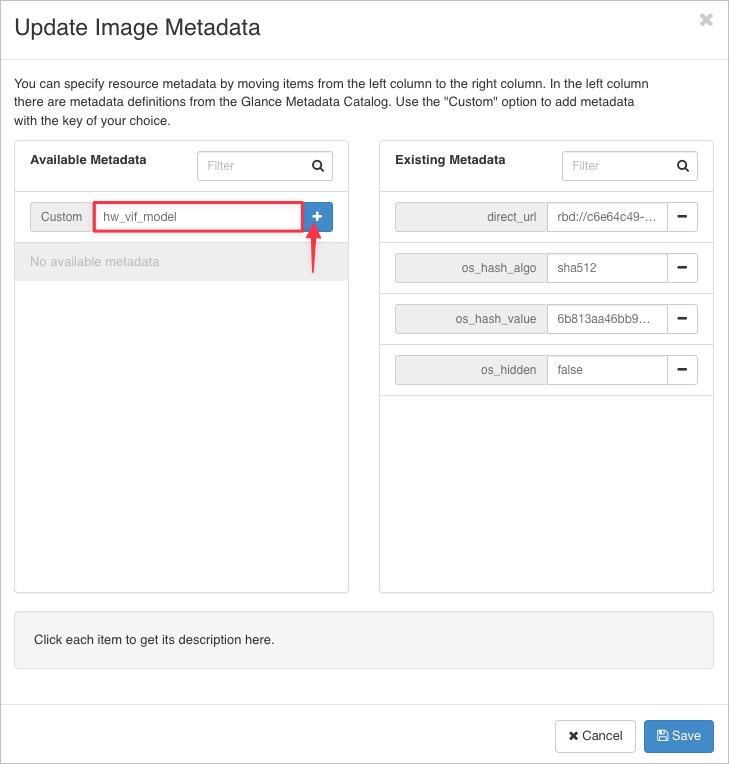
Please add additional metadata for uploaded image over GUI, It's recommended for VMware/Hyper-V to work properly
- hw_disk_bus="sata"
- hw_vif_model="e1000"
update image metadata
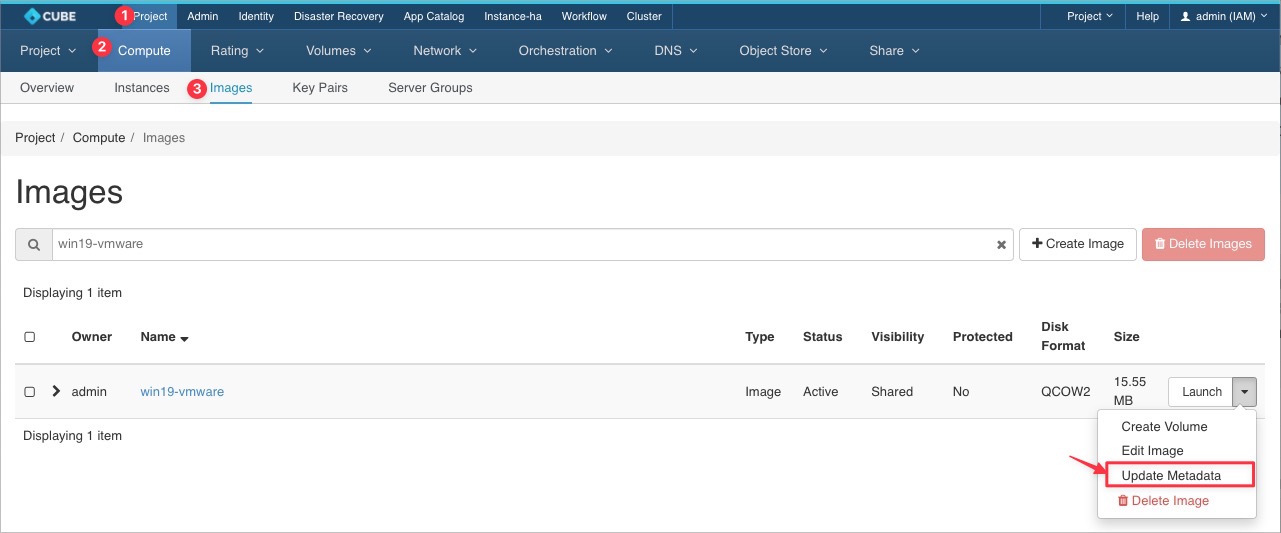
setting network driver - e1000
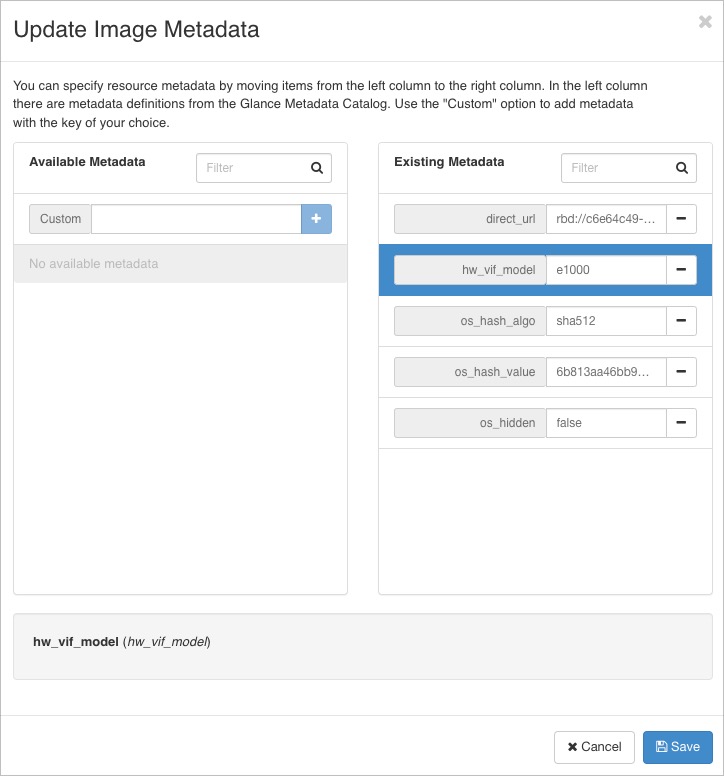
setting disk bus - sata
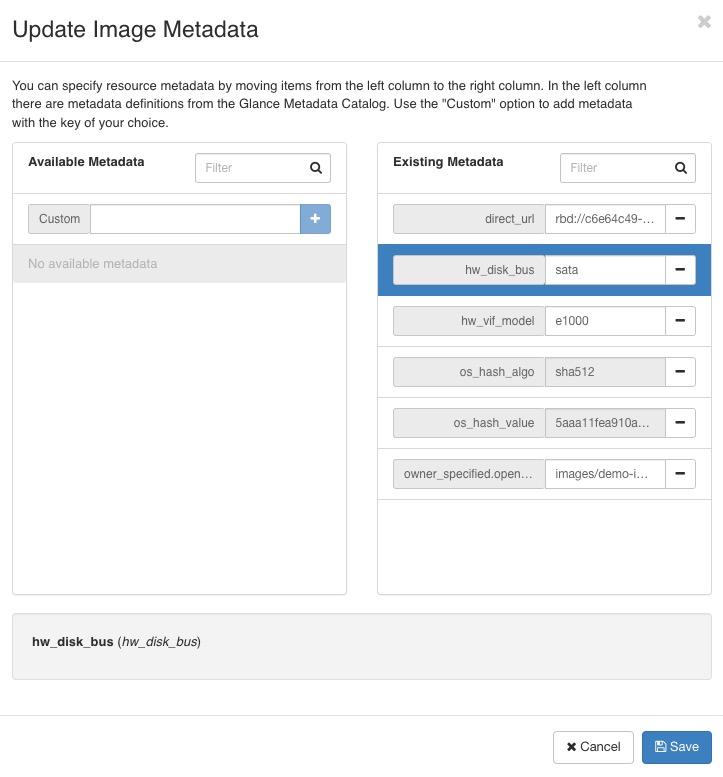
Glance metadata for UEFI images
- hw_disk_bus='sata'
- hw_firmware_type='uefi'
- hw_machine_type='q35'
- hw_qemu_guest_agent='True'
- os_secure_boot='optional'
- hw_vif_model='e1000'
- hw_video_model='vga'