# Automate private DNS record creation

> Learn to how to automatically create a DNS record whenever a floating IP is assigned to a virtual machine.

Learn to how to automatically create a DNS record whenever a floating IP is assigned to a virtual machine.

## Setting up the DNS Network {#setting-up-the-dns-network}

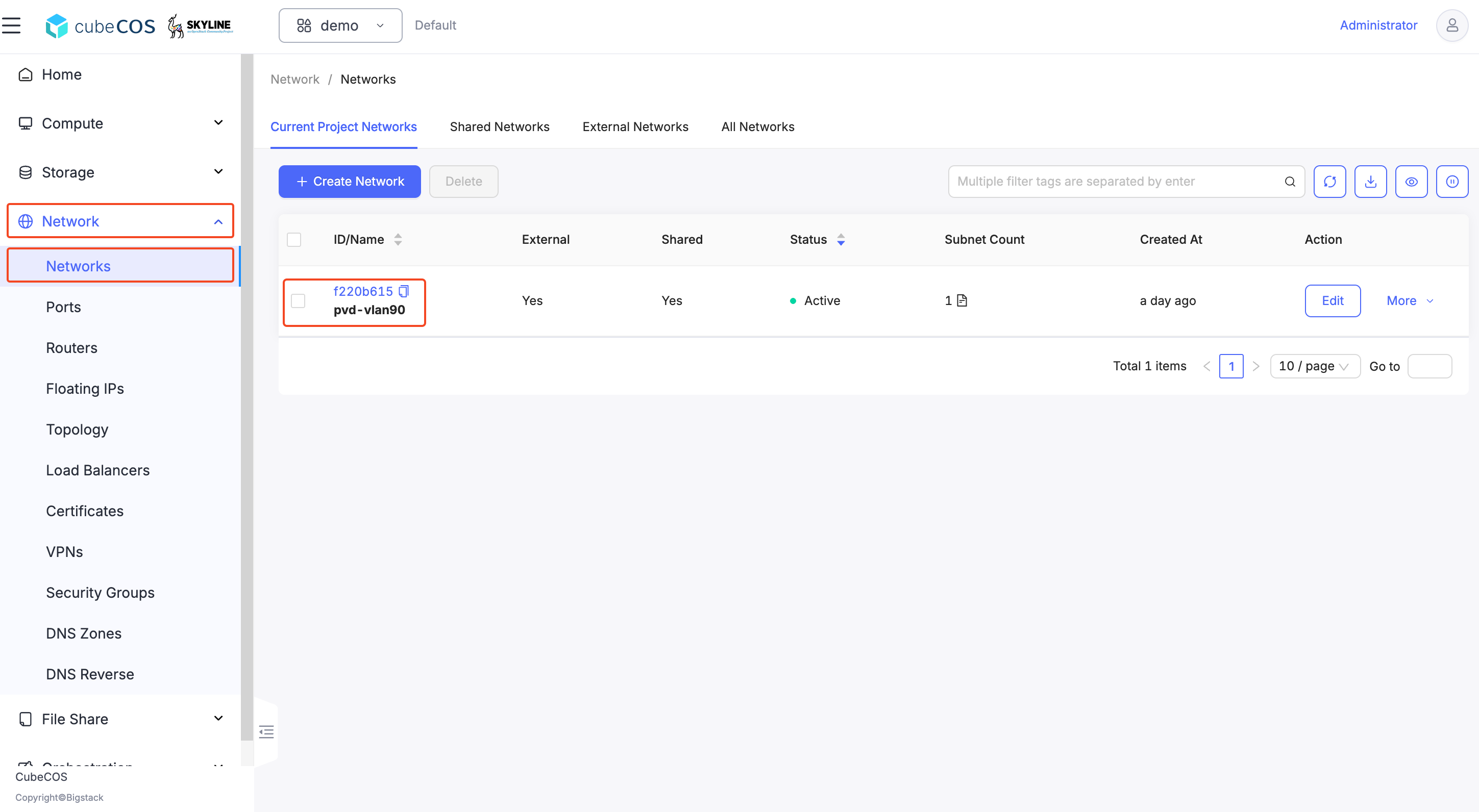
1. Navigate to `Network > Networks`, click on the `Network ID` from the list of your Networks.

   ![/assets/dns/skyline-dns-1.png](/assets/dns/skyline-dns-1.png)

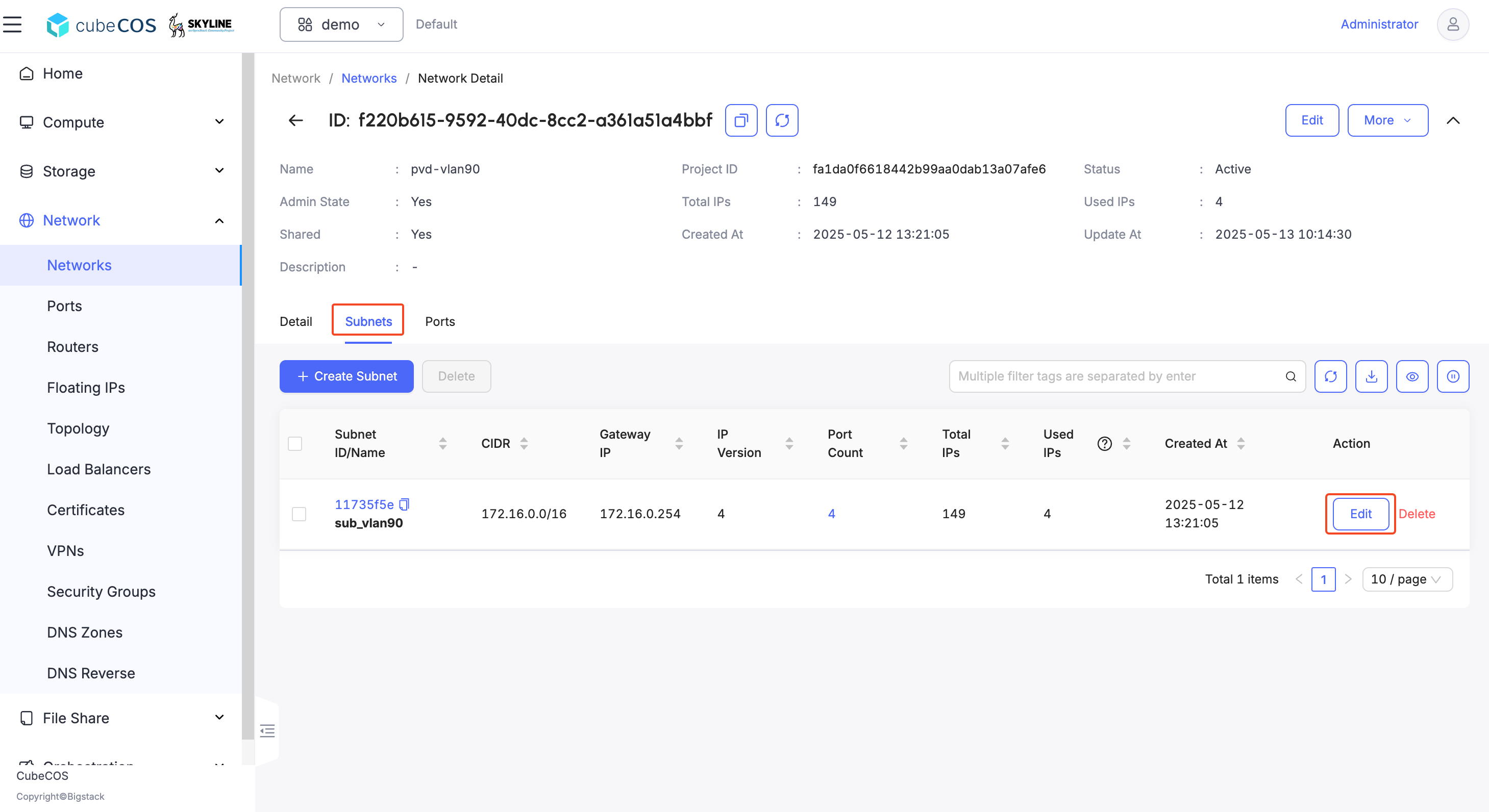
2. Select `Subnets` and click `Edit`.

   ![/assets/dns/skyline-dns-2.png](/assets/dns/skyline-dns-2.png)

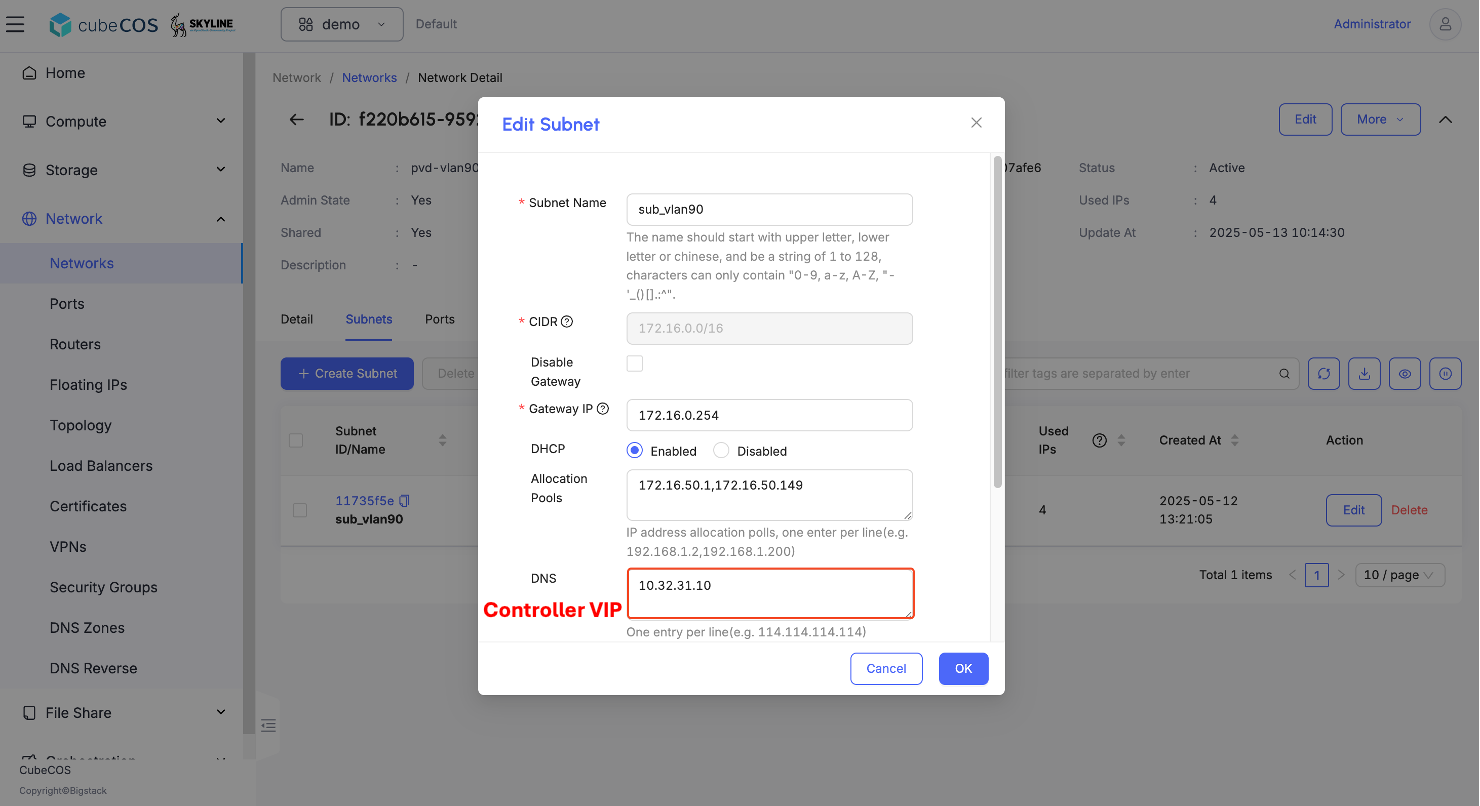
3. Type in DNS name servers with `Controller VIP`.

   ![/assets/dns/skyline-dns-3.png](/assets/dns/skyline-dns-3.png)

## Create DNS Zone {#create-dns-zone}

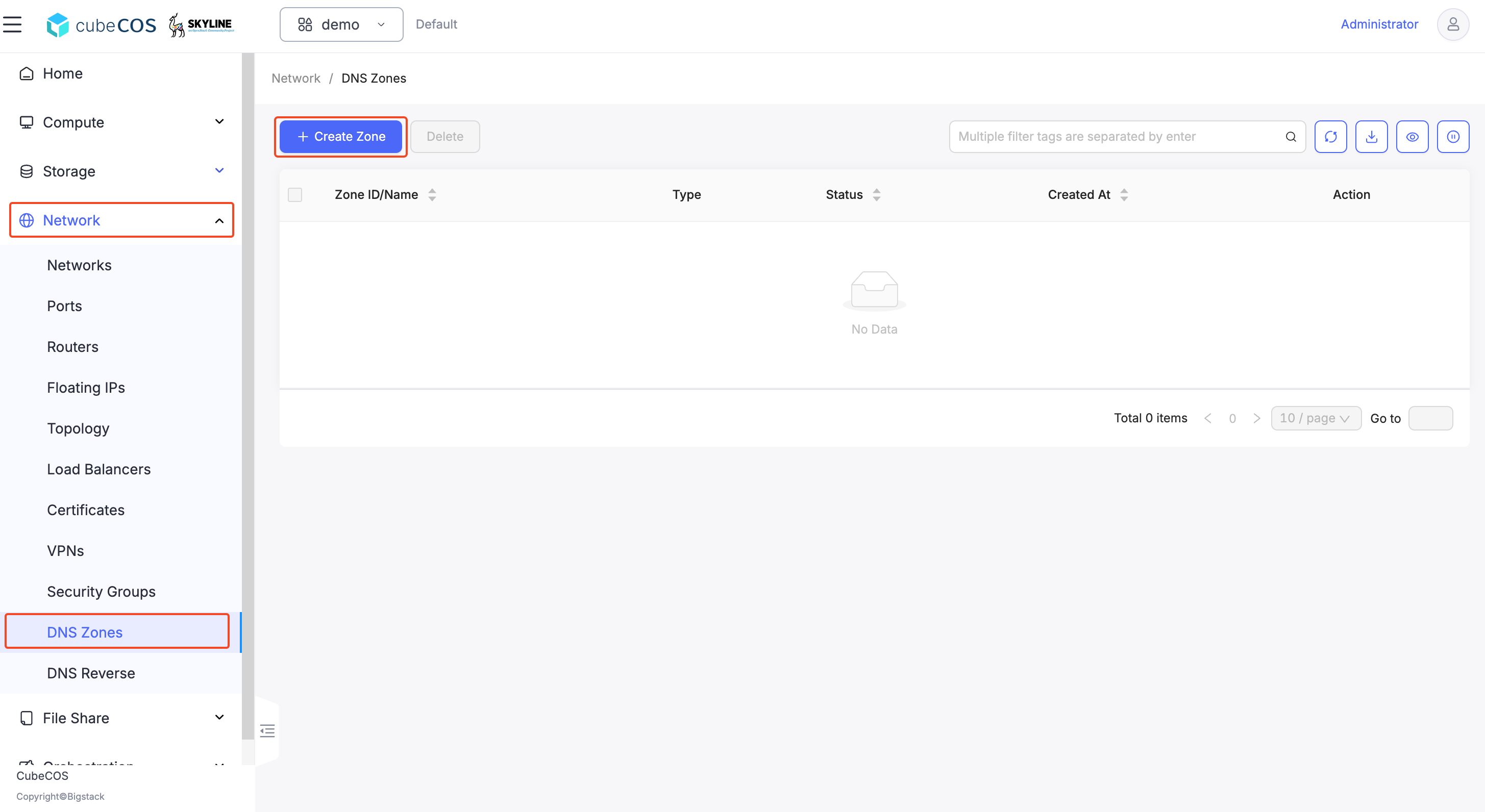
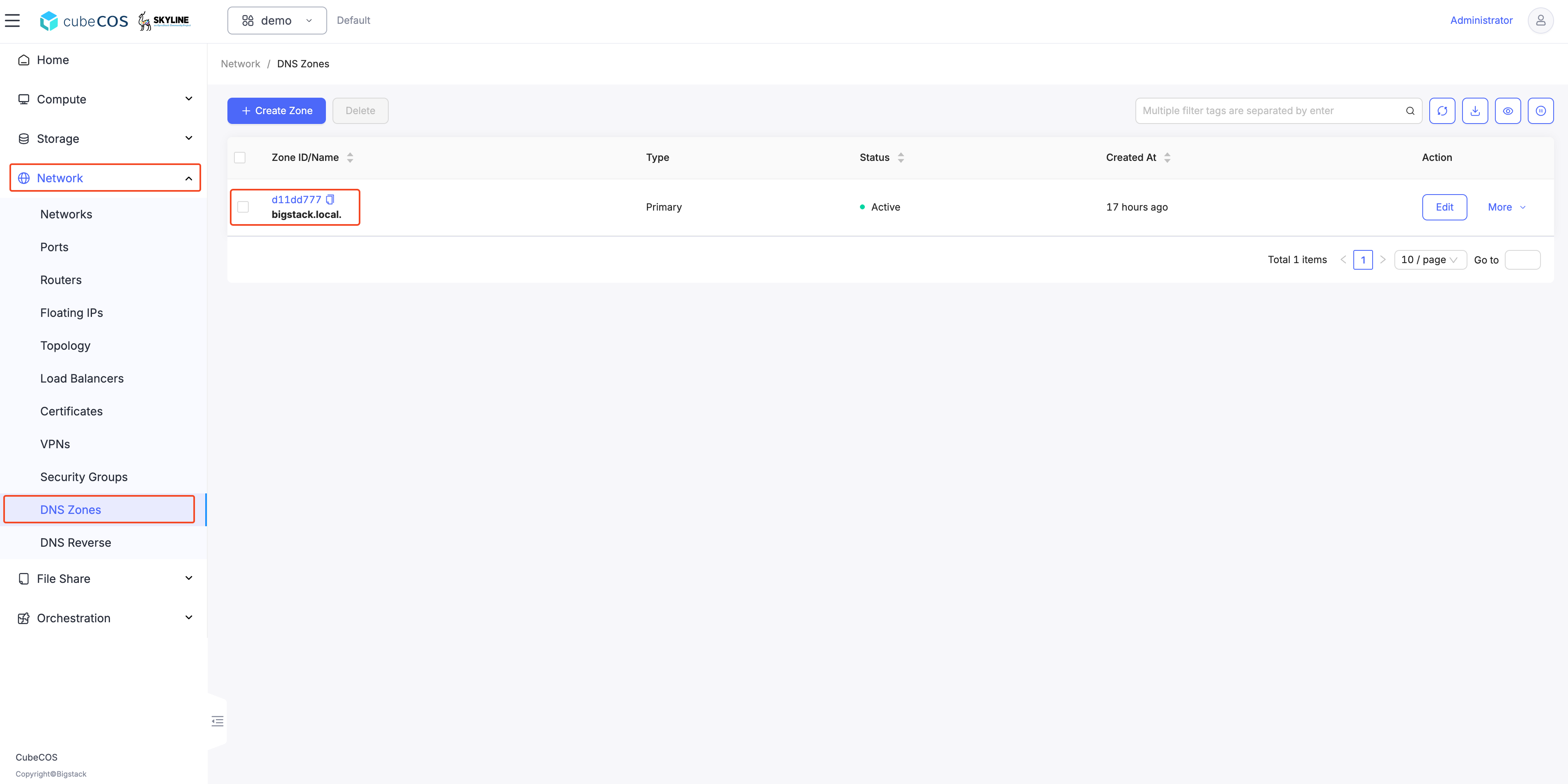
1. Navigate `Project > Network > DNS Zones`, click on the `CREATE ZONE`.

   ![/assets/dns/dns-4.png](/assets/dns/skyline-dns-4.png)

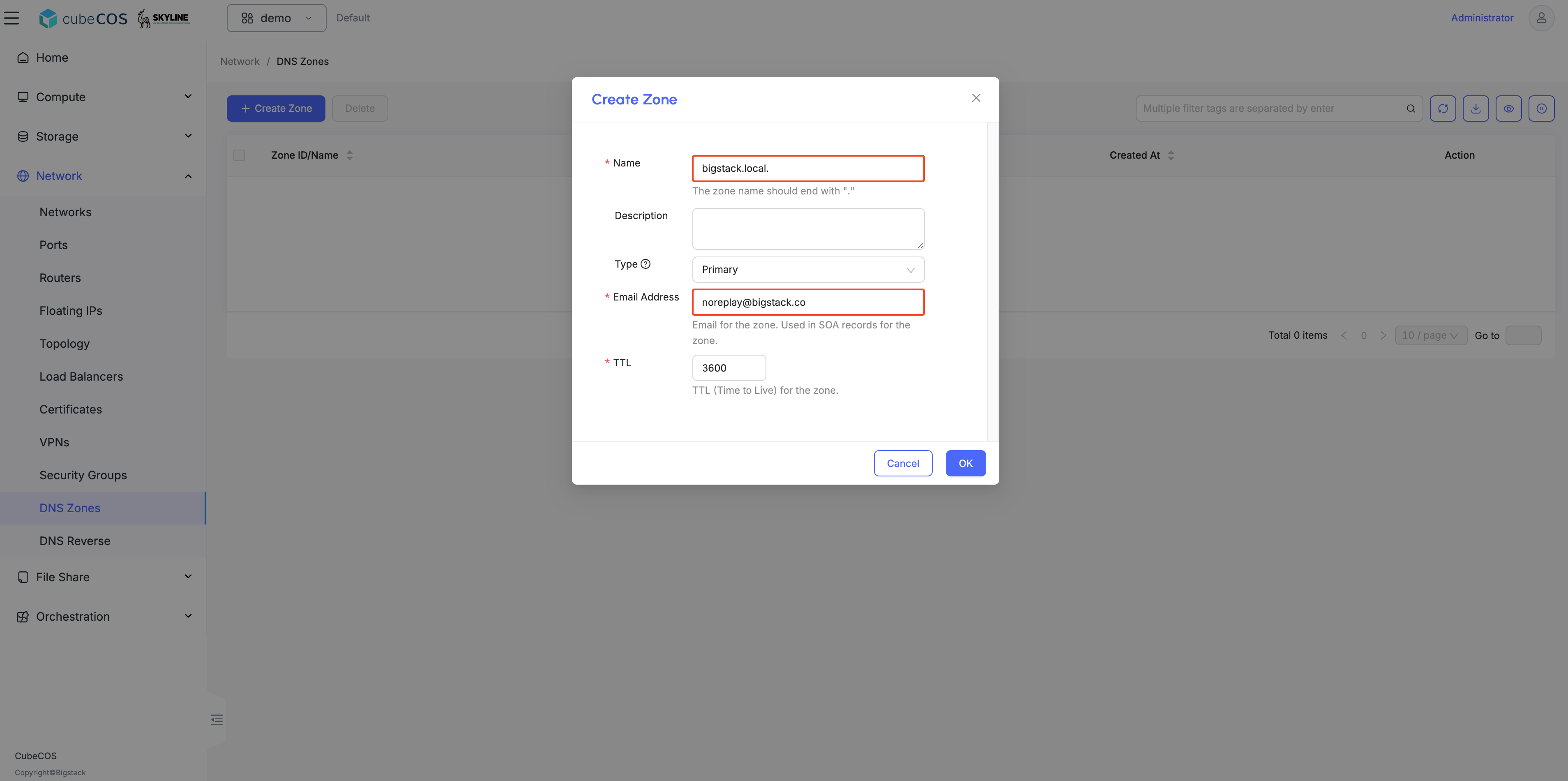
2. Create zone with a preferred/registered domain name.

   ![/assets/dns/skyline-dns-private-5.png](/assets/dns/skyline-dns-private-5.png)

## Connect to console {#connect-to-console}

**_Accessing CubeCOS cluster VIP via SSH_**

```bash
    $ ssh admin@172.16.1.20
    Warning: Permanently added '172.16.1.20' (ED25519) to the list of known hosts.
    admin@172.16.1.20's password:
    Welcome to Cube Appliance
    License (type: trial) is valid for 46 days
    Enter "help" for a list of available commands
    cc1>
```

## Setting a prefix dns_domain on a `private network` through CLI {#setting-a-prefix-dns_domain-on-a-private-network-through-cli}

```bash
    cc1> iaas network network_set
    Select domain:
    1: Default
    Enter index: 1
    Select tenant:
    1: admin
    Enter index: 1
    Select network:
    1: public
    2: pri_192
    Enter index: 2
    Select type:
    1: name
    2: description
    3: qos-policy
    4: no-qos-policy
    5: dns-domain
    6: no-dns-domain
    Enter index: 5
    Input value: bigstack.local.
    Updated network: a35cef55-02fa-49bf-9a1e-f844584544de
```

## Check up the dns_domain prefix {#check-up-the-dns_domain-prefix}

```bash
    cc1> iaas network network_show
    Select domain:
    1: Default
    Enter index: 1
    Select tenant:
    1: admin
    Enter index: 1
    Select network:
    1: public
    2: pri_192
    Enter index: 2
    +---------------------------+--------------------------------------+
    | Field                     | Value                                |
    +---------------------------+--------------------------------------+
    | admin_state_up            | UP                                   |
    | availability_zone_hints   |                                      |
    | availability_zones        |                                      |
    | created_at                | 2025-05-15T06:39:24Z                 |
    | description               |                                      |
    | dns_domain                | bigstack.local.                      |
    | id                        | a35cef55-02fa-49bf-9a1e-f844584544de |
    | ipv4_address_scope        | None                                 |
    | ipv6_address_scope        | None                                 |
    | is_default                | None                                 |
    | is_vlan_transparent       | None                                 |
    | mtu                       | 1442                                 |
    | name                      | pri_192                              |
    | port_security_enabled     | True                                 |
    | project_id                | b8d8d3f84f82451f9b6b6bbd1b115ec3     |
    | provider:network_type     | geneve                               |
    | provider:physical_network | None                                 |
    | provider:segmentation_id  | 2142                                 |
    | qos_policy_id             | None                                 |
    | revision_number           | 3                                    |
    | router:external           | Internal                             |
    | segments                  | None                                 |
    | shared                    | False                                |
    | status                    | ACTIVE                               |
    | subnets                   | e5976294-4e89-4f0d-b97f-2eec230d3758 |
    | tags                      |                                      |
    | updated_at                | 2025-05-15T06:40:48Z                 |
    +---------------------------+--------------------------------------+
```

## Associate Floating IP to your Instances {#associate-floating-ip-to-your-instances}

1. Navigate to `Project > Compute > Instance`.

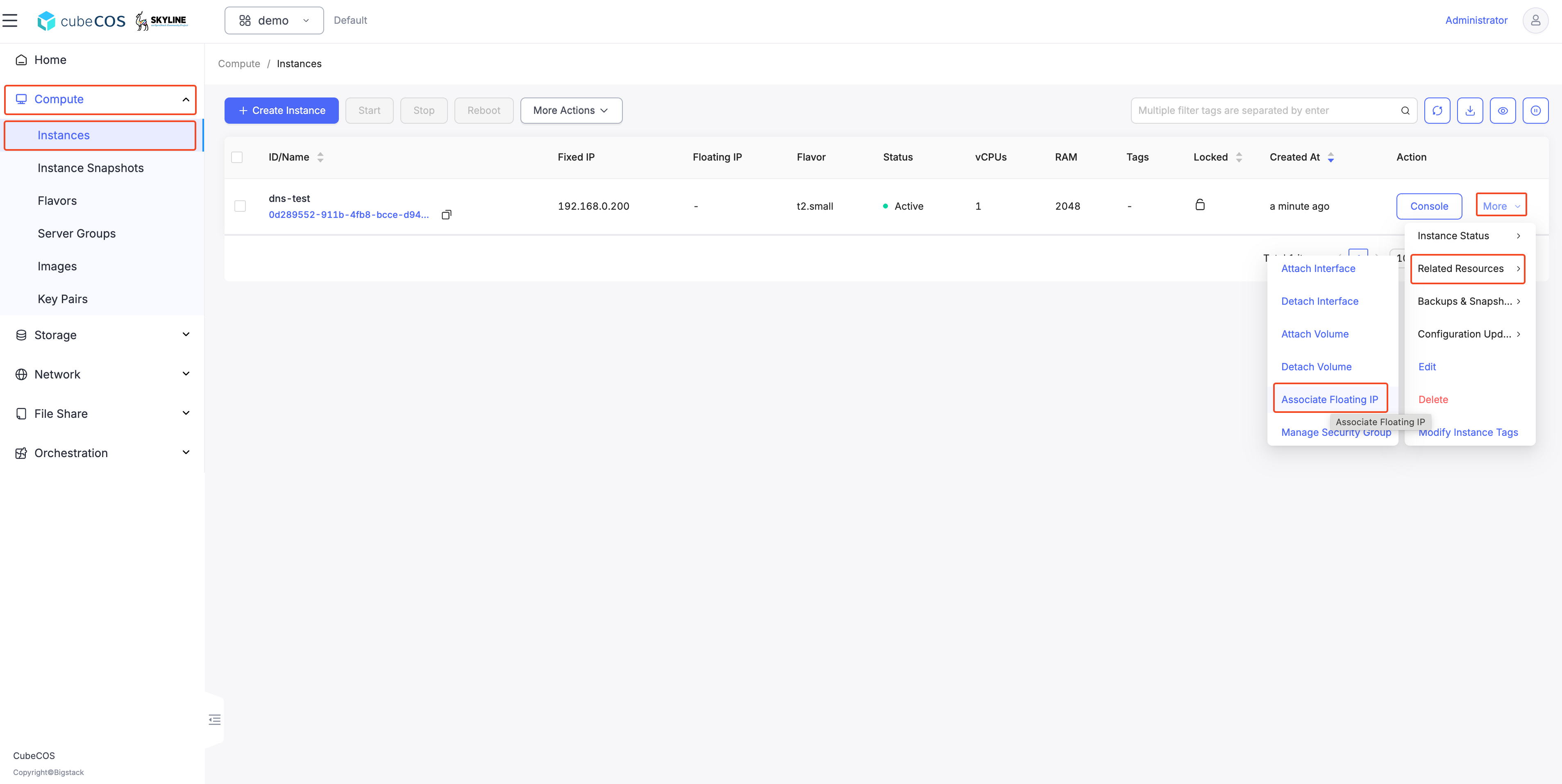
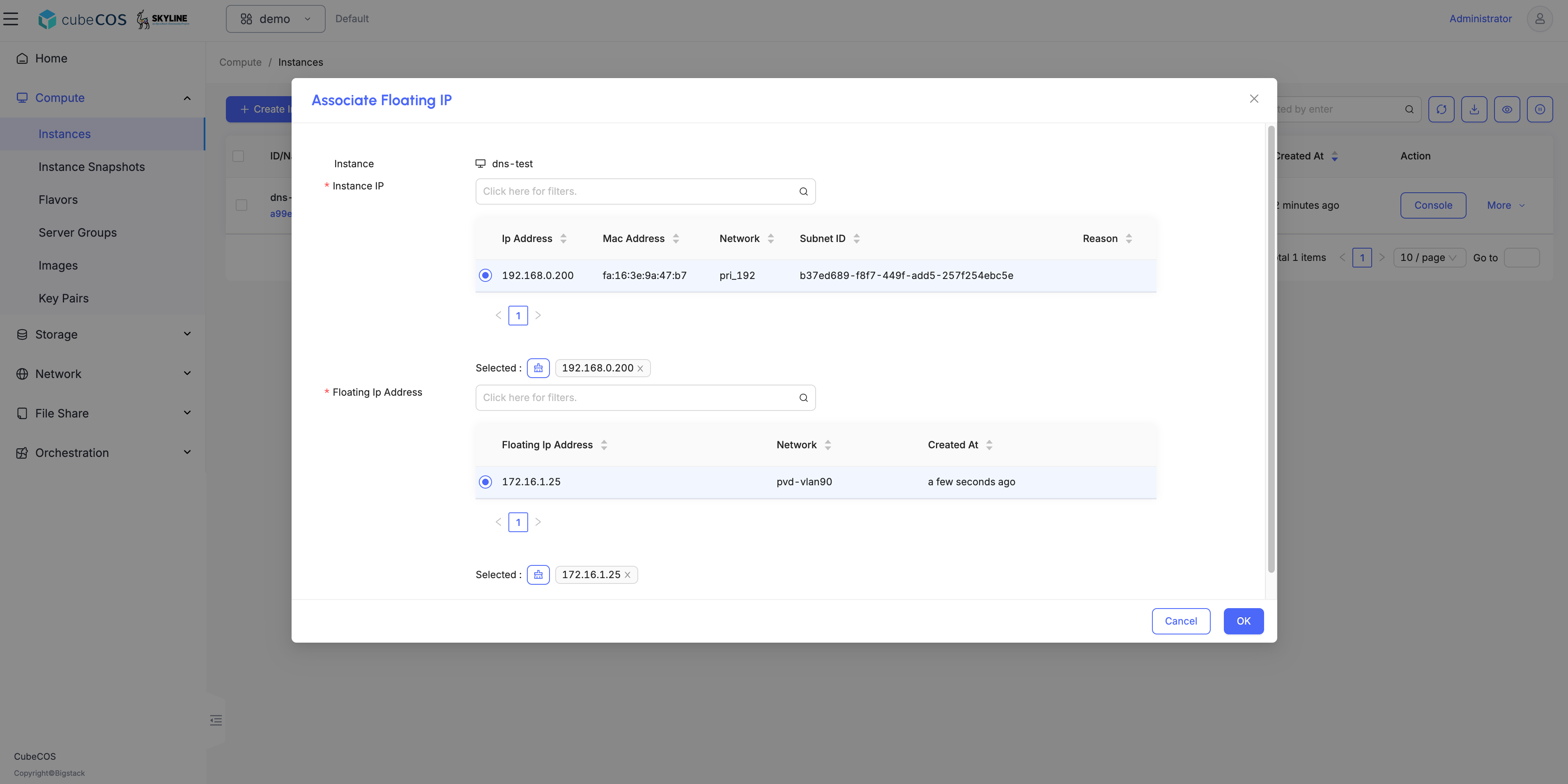
2. Hover over `More`, then `Related Resources`, and click `Associate Floating IP`.

   ![/assets/dns/skyline-dns-private-6.png](/assets/dns/skyline-dns-private-6.png)
   ![/assets/dns/skyline-dns-private-7.png](/assets/dns/skyline-dns-private-7.png)

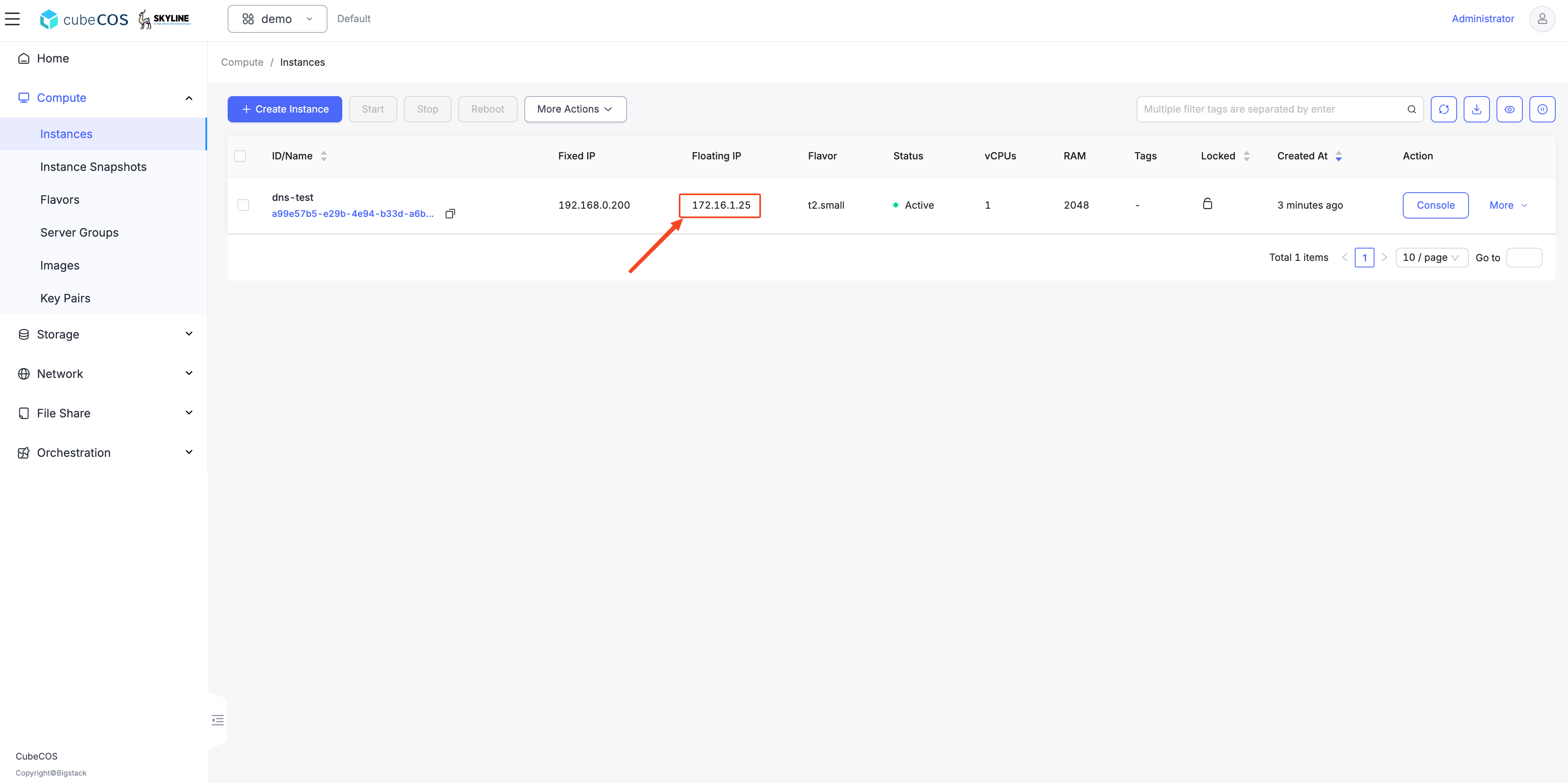
- An IP `172.16.1.25` has been associated to your instance `dns-test`

  ![/assets/dns/skyline-dns-private-8.png](/assets/dns/skyline-dns-private-8.png)

## Check the zone record set of `bigstack.local.` {#check-the-zone-record-set-of-bigstacklocal}

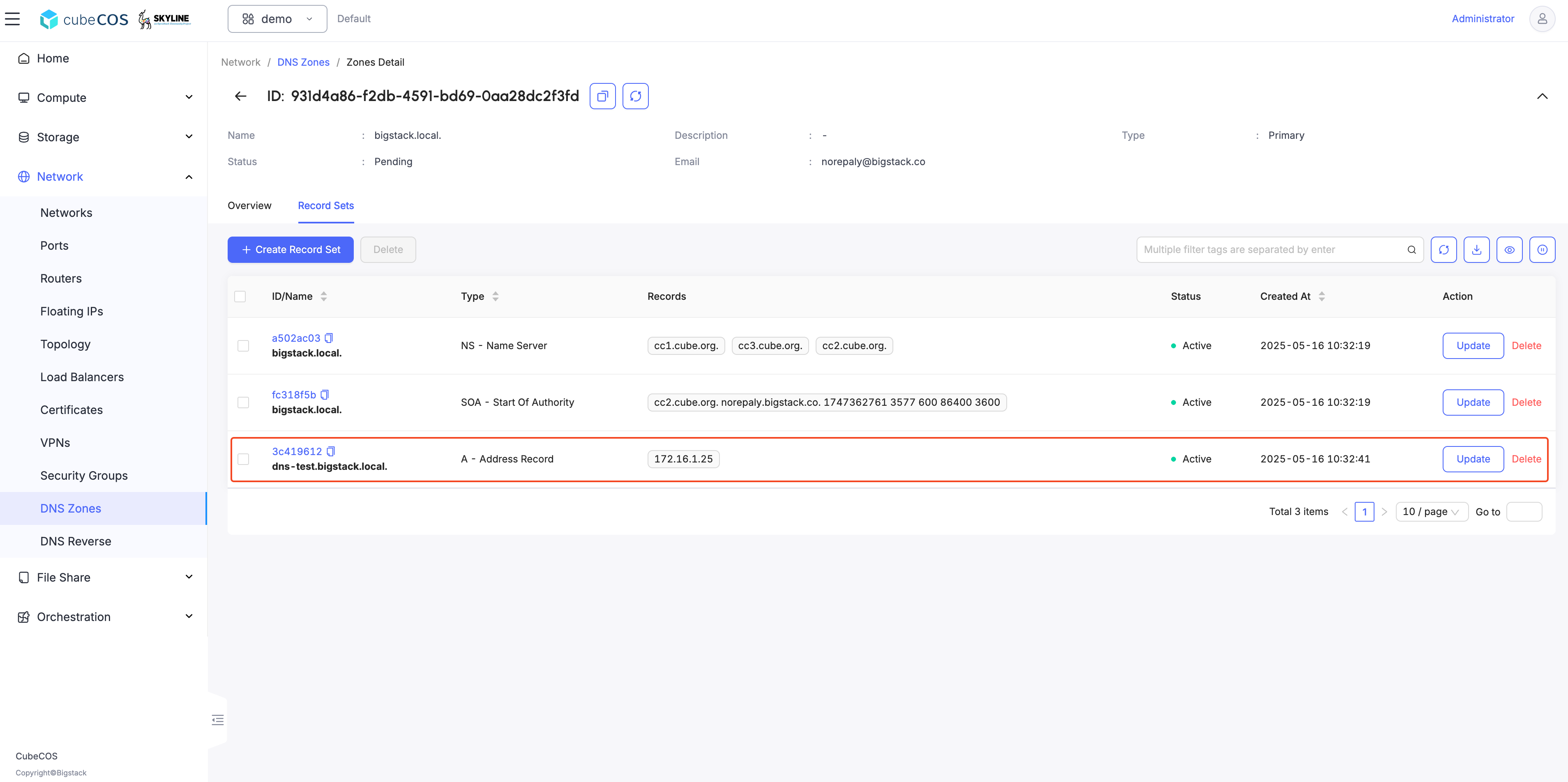
- A Record has been created according to your instance's hostname `dns-test.bigstack.local.`is mapping `172.16.1.25`

  ![/assets/dns/skyline-dns-private-9.png](/assets/dns/skyline-dns-private-9.png)
  ![/assets/dns/skyline-dns-private-10.png](/assets/dns/skyline-dns-private-10.png)

## Check the DNS with nslookup {#check-the-dns-with-nslookup}

- open a terminal and run `nslookup dns-test.bigstack.local. 10.32.31.10`

```bash
  ❯ nslookup dns-test.bigstack.local. 10.32.31.10
  Server:  10.32.31.10
  Address: 10.32.31.10#53

  Name: dns-test.bigstack.local
  Address: 172.16.1.25
```

## Summary {#summary}

In this use case, the address of a floating IP is published in the external DNS service in conjunction with the dns_name of its associated port and the `dns_domain` of the port’s network. The steps to execute in this use case are the following:

- Assign a valid domain name to the network’s `dns_domain` attribute. This name must end with a period (.).
- Boot an instance or alternatively, create a port specifying a valid value to its `dns_name` attribute. If the port is going to be used for an instance boot, the value assigned to `dns_name` must be equal to the host name that the Compute service will assign to the instance. Otherwise, the boot will fail.
- Create a floating IP and associate it to the port.

<!--
cc1> iaas
cc1:iaas> network network_set
Select domain:
1: Default
Enter index: 1
Select tenant:
1: admin
2: demo
Enter index: 2
Select network:
1: pri_192_168_10_0
2: pvd-vlan90
Enter index: 1
Select type:
1: name
2: description
3: qos-policy
4: no-qos-policy
5: dns-domain
6: no-dns-domain
Enter index: 5
Input value: bigstack.local.
Updated network: d6224725-a7bc-4581-a395-154f939268ed
```

## Check up the dns_domain prefix

```bash
cc1> iaas
cc1:iaas> network network_show
Select domain:
1: Default
Enter index: 1
Select tenant:
1: admin
2: demo
Enter index: 2
Select network:
1: pri_192_168_10_0
2: pvd-vlan90
Enter index: 1
+---------------------------+--------------------------------------+
| Field                     | Value                                |
+---------------------------+--------------------------------------+
| admin_state_up            | UP                                   |
| availability_zone_hints   |                                      |
| availability_zones        |                                      |
| created_at                | 2025-05-13T06:24:18Z                 |
| description               |                                      |
| dns_domain                | bigstack.local.                      |
| id                        | d6224725-a7bc-4581-a395-154f939268ed |
| ipv4_address_scope        | None                                 |
| ipv6_address_scope        | None                                 |
| is_default                | None                                 |
| is_vlan_transparent       | None                                 |
| mtu                       | 1442                                 |
| name                      | pri_192_168_10_0                     |
| port_security_enabled     | True                                 |
| project_id                | fa1da0f6618442b99aa0dab13a07afe6     |
| provider:network_type     | geneve                               |
| provider:physical_network | None                                 |
| provider:segmentation_id  | 92                                   |
| qos_policy_id             | None                                 |
| revision_number           | 3                                    |
| router:external           | Internal                             |
| segments                  | None                                 |
| shared                    | False                                |
| status                    | ACTIVE                               |
| subnets                   | 3029eb93-da71-4b38-b3af-1943adcab327 |
| tags                      |                                      |
| updated_at                | 2025-05-13T06:26:12Z                 |
+---------------------------+--------------------------------------+
-->