S3 API用のアクセスキーとシークレットキーを作成する
情報
USBストレージデバイスは、デフォルトでブロックされています。 USBデバイスへのアクセスが必要な場合は、管理者としてログインした後、CLI > tuning > configure を使用して、チューニングオプション cubesys.probeusb を true に設定してください。
SSH を使用して CubeCOS クラスタの VIP にアクセスする
$ ssh admin@<your-cluster-vip>
バケットを作成する
    cc1> s3 bucket create
    Select a user:
    1: admin
    2: skyline
    3: demo_user
    4: demo_user2
    5: app-framework
    6: bigstack
    7: bigstack-k8s
    8: CMP-demo
    Enter index: 1
    Input bucket path: adminbucket
    Bucket 's3://adminbucket/' created
アクセスキーとシークレットキーを作成する
    cc1> s3 ec2_key_create
    Select a user:
    1: admin
    2: skyline
    3: demo_user
    4: demo_user2
    5: app-framework
    6: bigstack
    7: bigstack-k8s
    8: CMP-demo
    Enter index: 1
    +------------+-----------------------------------------------------------------------------------------------------------------------------------+
    | Field      | Value                                                                                                                             |
    +------------+-----------------------------------------------------------------------------------------------------------------------------------+
    | access     | a4b6e082050e4bb0a8e3be5b2d4c5e8f                                                                                                  |
    | links      | {'self': 'http://172.16.0.10:5000/v3/users/d3e3012cea2e4fbeada6742b4c4f8bb1/credentials/OS-EC2/a4b6e082050e4bb0a8e3be5b2d4c5e8f'} |
    | project_id | c0978a86e3b242da9ba549acf5178266                                                                                                  |
    | secret     | d0f72c4c6f2a4082b3cb5a19b52d95e5                                                                                                  |
    | trust_id   | None                                                                                                                              |
    | user_id    | d3e3012cea2e4fbeada6742b4c4f8bb1                                                                                                  |
    +------------+-----------------------------------------------------------------------------------------------------------------------------------+
    cc1> s3 ec2_key_list
    Select a user:
    1: admin
    2: skyline
    3: demo_user
    4: demo_user2
    5: app-framework
    6: bigstack
    7: bigstack-k8s
    8: CMP-demo
    Enter index: 1
    +----------------------------------+----------------------------------+
    | Access                           | Secret                           |
    +----------------------------------+----------------------------------+
    | a4b6e082050e4bb0a8e3be5b2d4c5e8f | d0f72c4c6f2a4082b3cb5a19b52d95e5 |
    +----------------------------------+----------------------------------+
結果 {#test-result} をテストする
s3cmd
    $ s3cmd --no-ssl --host=http://172.16.0.10:8888 --host-bucket=http://172.16.0.10 --access_key=a4b6e082050e4bb0a8e3be5b2d4c5e8f --secret_key=d0f72c4c6f2a4082b3cb5a19b52d95e5 la

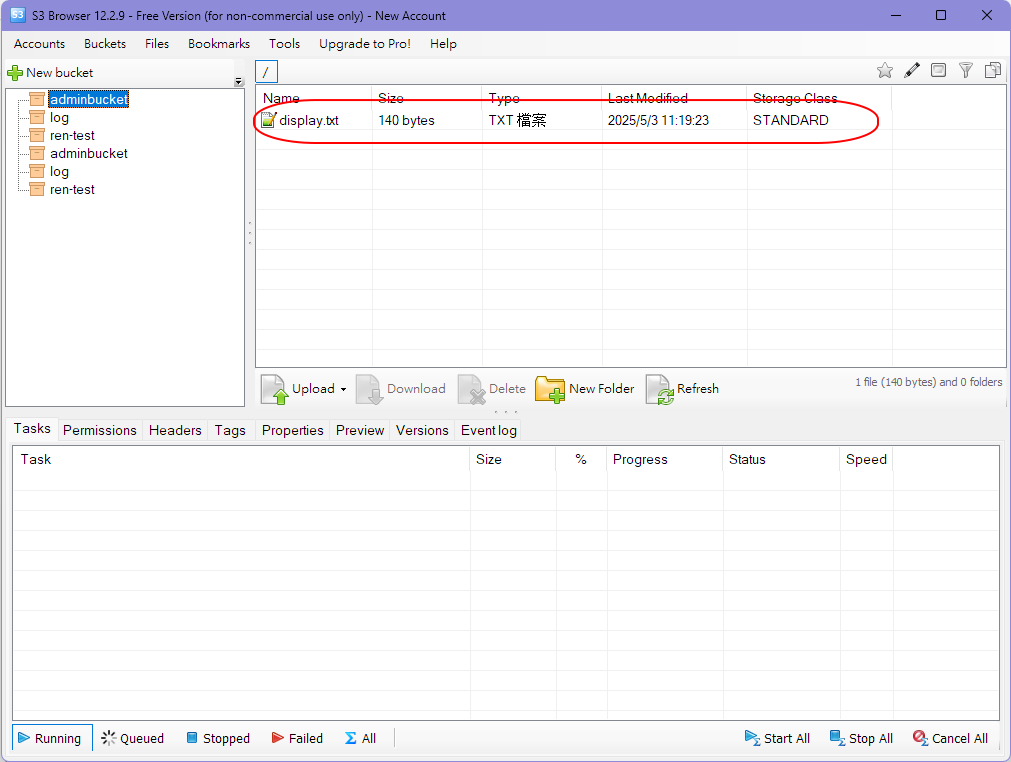
    2025-05-03 03:19          140  s3://adminbucket/display.txt
CLI
    cc1> s3 object put
    Select a user:
    1: admin
    2: skyline
    3: demo_user
    4: demo_user2
    5: app-framework
    6: bigstack
    7: bigstack-k8s
    8: CMP-demo
    Enter index: 1
    Select a media:
    1: usb
    2: local
    Enter index: 1
    Insert a USB drive into the USB port on the appliance.
    Enter 'YES' to confirm: YES
    1: display.txt
    Enter index: 1
    Input object path: adminbucket
    upload: '/mnt/usb/display.txt' -> 's3://adminbucket/display.txt'  [1 of 1]
    140 of 140   100% in    0s   177.50 B/s  done
    Uploading object to adminbucket3 complete. It is safe to remove the USB drive.
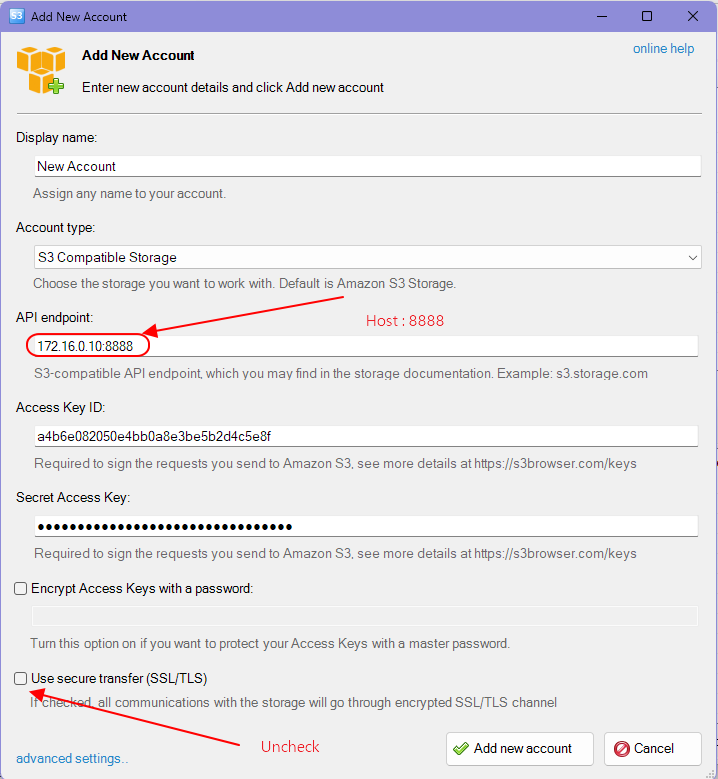
Microsoft Windows - S3 Browser
ダウンロード:https://s3browser.com/